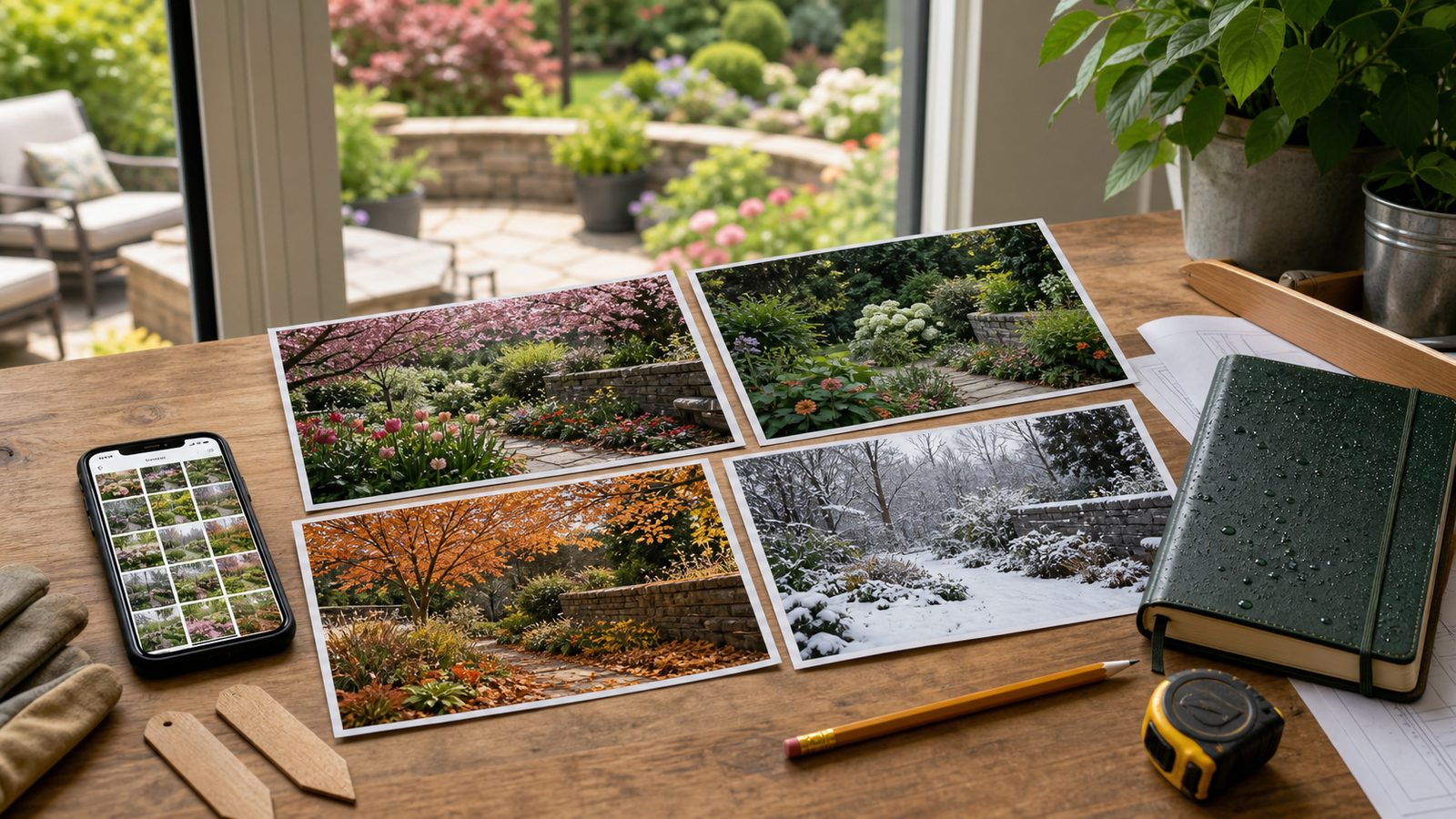
A garden changes faster than most homeowners realize. A bed that looks full in May may have a bare hole by July. A low spot that seems harmless in dry weather may hold water for 36 hours after a storm. A new shrub may look healthy at installation and decline slowly enough that you do not notice until the warranty window is nearly gone.
The best way to understand those changes is not expensive camera gear. It is consistent documentation: repeat photos from the same locations, a short garden journal, dated records of work performed, and clear before-and-after images before any landscape project begins. On our job sites, good photos often answer questions that memory cannot: where irrigation heads were located, how water moved across the yard, which plants were already stressed, and what condition patios, walls, walks, and beds were in before work started.
For most homeowners, a smartphone, a $20 to $80 tripod or phone mount, a $10 to $40 weatherproof notebook, and a simple folder system are enough. The return comes from better decisions. You avoid buying plants for a bloom gap you only imagined. You catch irrigation waste before it becomes a water bill problem. You give a contractor a tighter scope. You have dated proof for plant warranties, storm damage, drainage issues, and project punch lists.
Start With a Garden Record That Is Useful, Not Complicated
A garden record should do three jobs. First, it should show how the space looks across the year. Second, it should record what changed and when. Third, it should make future work easier to estimate, plan, and verify.
#1 Best Overall

- ''Plant Log'' pages allow you to track each plant you choose, from its beginnings in your garden through the growing season and beyond.
- Note successes for next year.
- Note what didn't work and why, so you won't repeat mistakes.
- Includes general gardening tips, lists of helpful websites, and dot matrix grid pages for laying out your vision.
- Opaque smooth-finish pages take pen or pencil.
Do not build a system so detailed that you quit after two weekends. A practical record can be as simple as monthly photos, a few notes, and organized files. The key is repetition. One beautiful flower close-up is nice. Twelve boring wide shots from the same place, taken once a month, become a real record of plant growth, shade, mulch breakdown, lawn stress, drainage behavior, and seasonal balance.
Use this basic monthly routine:
- Take wide photos from 4 to 8 fixed locations.
- Take close-ups of plants, pests, disease, blooms, fruit, labels, and problem areas.
- Write 1 to 3 notes per area: weather, work done, and what changed.
- Save files by year, month, and garden area.
- Back up photos to cloud storage or an external drive at least once per month.
That is enough for most residential gardens. During peak bloom, harvest season, or a landscape project, increase the frequency to weekly or event-based photos.
Set Up 4 to 8 Permanent Photo Stations
The most valuable garden photos are repeatable. Pick fixed photo stations and use them all year. You are trying to build a visual timeline, not a collection of random snapshots.
Good photo stations include:
- Front curb or driveway looking back at the house.
- Entry walk or front porch.
- Patio, deck, or back door looking into the yard.
- Each major planting bed.
- Vegetable garden or raised-bed area.
- Drainage trouble spot, swale, low corner, or downspout discharge area.
- Best long view across the yard.
- Any area planned for future renovation.
Mark each station in a way that does not interfere with the yard. A small landscape nail at the edge of a bed, a paint mark on pavement, a fence post, the corner of a step, or a note such as “stand at left patio post, shoot toward maple” is enough.
Keep the Camera Position Consistent
For useful comparisons, shoot from the same height, direction, and approximate zoom setting. If you use a phone, choose 1x zoom for most wide shots. Stand in the same place and hold the phone at chest height, usually about 4 to 5 feet above grade. Try to shoot at the same time of day so shadows do not mislead you.
For close-ups, include scale. A ruler, coin, plant tag, hand tool, or gloved hand can show whether a leaf spot is spreading, a crack is widening, or a plant has doubled in size. For plant-health documentation, avoid heavy filters. Accurate color matters when comparing chlorosis, fungal symptoms, drought stress, or bloom color.
Use a Seasonal Photo Schedule
Gardens do not fail or succeed in one season. A planting that looks strong in spring may collapse in summer heat. A yard that looks tidy in September may have no winter structure. A good documentation schedule captures the whole cycle.
For most homes, use this schedule:
- Monthly wide shots from every fixed station.
- Weekly photos during peak bloom, harvest, or active construction.
- After-event photos after storms, freezes, heat waves, irrigation repairs, planting, pruning, fertilizing, mulching, and contractor work.
The monthly shots should show the same views even when nothing looks special. Those quiet images become valuable when you are deciding where to add shrubs, whether a bed is too crowded, or why turf keeps thinning in the same area every August.
Quick wins for a faster PC:
Clear out junk files and repair common Windows errorsFree Scan →Fix the driver behind crashes, sound loss and screen glitchesFind Drivers →Build the Year as a Story
A complete garden record should show winter structure, spring emergence, early bloom, peak bloom, summer stress, fall color, cleanup, and dormant-season hardscape condition. This matters because many landscape decisions are made at the wrong time. Homeowners often shop in May, when garden centers look full and fresh, then end up with a yard that has no late-summer color or winter interest.
Use photos to identify gaps by month before buying perennials, bulbs, shrubs, or annual color. If July photos show bare soil and tired foliage, do not solve that from memory in October. Mark the exact area, measure the open space, and buy for that condition.
Pair Photos With a Simple Garden Journal
A garden journal does not need long entries. The best version is short, dated, and specific. You are trying to record facts that will be useful later.
For each garden area, note:
- Date and weather conditions.
- Rainfall or irrigation run time if known.
- Planting, pruning, fertilizing, spraying, mulching, or soil work.
- Bloom dates and harvest dates.
- Pest, disease, or animal damage.
- Plants that performed well or failed.
- Receipts, product names, plant tags, and warranty information.
A good entry might read: “2026-05-15, front bed. Added 2 inches shredded hardwood mulch. Planted three 3-gallon hydrangeas, north side of walk. Soil damp at 6 inches after rain yesterday. Existing boxwood yellowing on south edge.” That is more useful than a full page of impressions.
Do these 3 things before closing this tab:
1Clear out junk files and repair common Windows errors2Scan for outdated or missing drivers - takes under a minute3Repair Windows errors before they cause bigger problemsRank #2

- PLAN YOUR GARDEN WITH CONFIDENCE – Keep every planting detail in one place, from seed selection to garden layout, companion planting, and crop rotation. Perfect garden log book for beginners and seasoned gardeners.
- TRACK ALL SEASON LONG – This gardening notebook helps you stay on top of seasonal to-dos, garden maintenance, and planting schedules for every stage of growth. Never miss a watering, pruning, or fertilizing task again.
- FROM FIRST SEED TO FINAL HARVEST – Use this gardening calendar to record germination, growth milestones, pollination needs, and harvest dates to ensure maximum yield and healthy plants.
- KEEP DETAILED GARDENING NOTES – Log essential information for each plant, including variety, supplier, cost, planting date, and soil and pest control practices.
- MANAGE EXPENSES WITH EASE – This gardening journal planner and log book helps you track your garden purchases in one organized log to make budgeting simple and efficient.
For construction and landscaping records, include measurements when possible. Record bed depth, path width, retaining wall height, drainage pipe size, paver dimensions, and mulch depth. If a contractor asks for the area of a future bed, a photo plus “front bed is 6 feet deep by 28 feet long” gives them a stronger starting point than a wide-angle photo alone.
Organize Files So You Can Actually Find Them
A garden record buried in an unsorted camera roll loses most of its value. Use a file system that works even if you never buy a garden app.
A practical folder structure is:
- 2026/04-front-bed
- 2026/05-patio-border
- 2026/07-vegetable-garden
- 2026/after-storm-drainage
- 2026/contractor-before-photos
Use filenames that explain the photo without opening it. For example: “2026-05-15_front-bed_after-mulch.jpg” or “2026-08-03_back-left-corner_after-storm-standing-water.jpg.” This takes a few extra seconds when saving photos, but it saves real time later.
Cloud storage usually costs about $20 to $100 per year for homeowners who need extra space. Garden planner and journal apps in 2026 commonly range from free tiers to about $20 to $40 per year for premium features. Apps can be useful if you want plant databases, reminders, or bed layouts, but a folder system and spreadsheet still work well.
What’s actually slowing this PC down?
Pick the symptom - the matching free tool is one click away.
Document Irrigation, Drainage, and Water Use
Pretty garden photos are useful. Photos of water movement are often more valuable.
Residential outdoor water use in the United States is nearly 8 billion gallons per day, mostly for landscape irrigation. EPA WaterSense information has reported that up to 50% of landscape water can be wasted through inefficient irrigation and overwatering. That is not just an environmental issue. It is a yard-health issue, a utility-cost issue, and sometimes a building issue if water is moving toward foundations, walks, patios, or retaining walls.
Photograph irrigation while it is running. Capture each zone from multiple angles so dry spots, overspray, blocked heads, runoff, and spray against siding or pavement are visible. If one bed stays wet and another stays dry, photos help determine whether the issue is head placement, pressure, plant selection, soil compaction, slope, or run time.
WaterSense labeled irrigation controllers apply water based on plant need and weather conditions. Older EPA WaterSense material cited about 8,800 gallons saved per average home annually when replacing a standard clock timer with a labeled controller. If you upgrade controllers, document the old timer, zone map, controller settings, and the first few weeks of plant response.
Photograph Drainage After Storms
Do not wait until the yard dries out. Take photos during rain if it is safe, immediately after the storm, 2 hours later, 12 hours later, and 24 to 48 hours later. Record where water stands, where it flows, where mulch moves, and whether downspouts discharge into beds, across walks, or toward the foundation.
For drainage documentation, include:
- Wide shots showing slope and water path.
- Close-ups of standing water with a ruler or marked stake.
- Downspouts, splash blocks, drain inlets, and outlet locations.
- Soil erosion, exposed roots, lifted pavers, or washed mulch.
- Basement, crawlspace, patio, or walkway impacts if present.
Those photos can help a contractor determine whether the solution is regrading, a swale, a French drain, downspout extension, catch basin, permeable surface, soil amendment, or plant replacement.
Track Costs Before They Become Guesswork
Garden documentation is also a budgeting tool. Landscape work can range widely in 2026, and photos help keep estimates tied to actual site conditions.
| Item or Service | Typical 2026 Cost Range | Best Use |
|---|---|---|
| DIY garden documentation | Nearly free with a smartphone | Monthly records, planting notes, warranty support |
| Weatherproof notebook | $10-$40 | Quick notes outdoors |
| Plant tags or markers | $15-$60 | Cultivar names, dates, bed mapping |
| Tripod or phone mount | $20-$80 | Consistent photo stations and before-and-after shots |
| Extra cloud storage or garden apps | $20-$100/year for storage; many apps about $20-$40/year | Backups, reminders, digital planning |
| Professional landscaping | Commonly about $4.50-$12/sq. ft.; complex work can run $25-$50+/sq. ft. | Installation, renovation, grading, hardscape, irrigation |
| Basic residential garden design | Published ranges around $0.05-$0.15/sq. ft.; some small-garden design-only work around $0.05-$0.75/sq. ft. | Planting plans, layout, phased improvements |
| Professional garden photography | A few hundred dollars for a limited local session to $2,500/day or more for high-end commercial work | Finished project portfolios, estate records, commercial marketing |
Cost variance is driven by region, yard size, site access, slope, soil condition, drainage problems, mature plant material, hardscape scope, lighting, irrigation complexity, designer experience, photographer licensing, travel, editing, and whether the work is for personal records or commercial use.
Free tools Windows power users keep installed
One-click scans. No signup required.
Rank #3

- Complete Garden Planner Journal and Log Book – This gardening planner helps gardeners plan layouts, record seeds and plants, track care routines, log harvests, and review each growing season in one organized garden planner and log book
- Designed for Beginner & Everyday Gardeners – A practical garden journal and planner for backyard gardeners, plant lovers, vegetable growers, flower gardeners, and anyone who wants an easy way to stay organized from seed starting to harvest
- Organized Sections for Real Garden Use – Includes garden layout pages, seed starting tracker, seed inventory, plant profile, watering schedule, soil pH tracker, sunlight tracker, pest and disease logs, harvest log, budget pages, monthly planner pages, and notes
- Large A4 Spiral Bound Gardening Journal Notebook – The A4 size gives more writing space for planning, sketching garden beds, tracking plants, and recording notes. Black twin-wire spiral binding helps the garden journal spiral bound notebook lay flat while writing
- Durable Cover & Smooth Writing Paper – Made with a transparent PVC protective cover, black spiral binding, and 100 GSM recyclable paper designed for everyday garden planning. A useful garden log book for home gardens, raised beds, containers, and seasonal planning
For most homeowners, the best return is not a new camera. It is a consistent record that prevents expensive rework. If photos show that a bed gets blasted by afternoon sun in July, you are less likely to spend $400 on shade-loving plants that fail by August. If storm photos show runoff crossing a planned patio location, you can solve drainage before installing pavers.
Use Documentation Before Hiring a Contractor
Before a landscape renovation, build a small photo brief. On our job sites, this can shorten discovery and reduce scope confusion because everyone is looking at the same conditions.
Your brief should include:
- Current wide views from fixed photo stations.
- Problem areas such as drainage, erosion, dead turf, failing plants, cracked walks, or uneven patios.
- Access constraints, including gates, steps, fences, slopes, tight driveways, overhead wires, and septic or utility areas.
- Existing irrigation heads, valve boxes, hose bibs, lighting, drains, and cleanouts.
- Plant tags, receipts, and known installation dates.
- Favorite views you want to preserve.
- Inspiration images, clearly separated from current-condition photos.
Measure key areas. A bed that is 4 feet deep supports different plant choices than one that is 10 feet deep. A 36-inch gate changes equipment access. A 30-inch walkway feels different from a 48-inch walkway. A 12-inch retaining edge is a different project than a 4-foot retaining wall.
Photograph existing grades and hardscape before work starts. Capture patio edges, stair conditions, wall faces, settlement, cracks, low spots, utilities, and plant health. This protects both homeowner and contractor. If a shrub was declining before construction, dated photos show it. If a paver walk was level before nearby work, photos help identify what changed.
Know When Permits and Safety Records Matter
Not every garden improvement needs a permit, but some landscape work crosses into regulated construction. Rules vary by city, county, and state, so check with your local building department before work begins.
Small planting, mulching, seasonal color, ordinary pruning, and simple garden journaling usually do not trigger permits. Projects more likely to require review include retaining walls over a local height threshold, decks, covered structures, fences over certain heights, major grading, drainage changes, electrical work for lighting, irrigation connections, outdoor kitchens, gas lines, pools, and work in easements, wetlands, flood zones, or protected tree areas.
Some codes exempt limited work, but local amendments can be stricter. For example, residential code exemptions may cover certain small structures or low retaining walls, while counties and cities may still regulate grading, drainage, shoreline work, tree removal, utilities, or zoning setbacks. Treat online rules as a starting point, not final approval.
Documentation helps here. Before applying for a permit or asking whether one is needed, gather photos that show the existing condition, property features, slopes, drainage paths, fences, structures, and neighboring impacts. If work is near a property line, easement, utility, or drainage course, include a simple sketch with measurements.
Recommended Free Tools
When to DIY vs. When to Hire a Pro
Most garden documentation is a DIY job. You should handle routine monthly photos, plant records, bloom tracking, irrigation observations, receipts, and seasonal notes yourself. The homeowner sees the garden every day, which is exactly why consistent records work.
Hire a professional when documentation needs to support a larger project, legal question, insurance claim, commercial portfolio, or high-value property record. A professional landscape designer, contractor, surveyor, arborist, irrigation specialist, drainage contractor, or photographer may be appropriate depending on the issue.
DIY Is Usually Enough When
- You are tracking blooms, plant health, pruning, watering, and maintenance.
- You want before-and-after photos for your own records.
- You are planning small beds, annual color, bulbs, or vegetable rotations.
- You need better information before buying plants.
- You want to compare irrigation performance across zones.
Bring in a Pro When
- Water moves toward the foundation, garage, patio, or neighboring property.
- Retaining walls, stairs, decks, outdoor structures, utilities, or major grading are involved.
- You need a landscape plan for a multi-thousand-dollar installation.
- A mature tree shows decline, cracks, fungus, heaving soil, or large dead limbs.
- You need permit drawings, stamped plans, survey data, or commercial-grade images.
If you do hire a pro, your documentation still matters. It gives them a better starting point and can reduce time spent reconstructing history. A contractor can learn a lot from one year of storm photos, irrigation notes, and monthly wide shots.
Independent reader supportYour contribution helps us test, update, and keep practical guides available for everyone.Common Documentation Mistakes to Avoid
The biggest mistake is taking only attractive close-ups. Flower photos are useful, but they do not show structure, spacing, bare spots, mulch depth, lawn condition, hardscape settlement, or drainage. Every close-up should be supported by wide shots.
PC Slower Than It Used to Be?
A free scan shows the junk files, broken settings and background clutter dragging Windows down - then fixes them in one click.Free scan · Windows 10 & 11Outdated Drivers Are Slowing You Down
One free scan finds every outdated or missing driver and matches the right update for your exact hardware.Free scan · exact hardware matchRank #4

- Sturdy Construction: Our Lined Spiral Journal Notebook is built to last with a sturdy metal twin-wire binding and a tough hardcover. The water-resistant cover shields your notes from damage, while the double-wire design allows for easy folding and flat laying.
- High-Quality Paper: Crafted from 100 GSM thick, ink-friendly paper, our notebook prevents ink bleed-through and ghosting. It accommodates various pens, including ballpoint, gel, and fountain pens. Each page features a day header for effortless date tracking.
- Organized and Functional Design: With 140 lined pages and a 6-page blank table of contents, our notebook offers ample space for note-taking and easy referencing. An inner pocket keeps miscellaneous items secure, and an elastic closure band ensures the notebook stays closed when not in use.
- Versatile Usage: Suitable for office, school, and home environments, our notebook is perfect for journaling, note-taking, drawing, goal setting, Bible, and planning. It's a thoughtful present for friends, family, classmates, and colleagues.
- Medium-Sized Portability: Measuring 6 inches x 8 inches, our medium notebook strikes the perfect balance between portability and functionality. Its sturdy construction and aesthetic design make it an ideal companion for all your writing endeavors.
Other common mistakes include changing camera position every time, skipping plant tags, forgetting receipts, documenting only peak bloom, relying on memory for watering or pruning, leaving photos unsorted, using heavy filters, and failing to photograph buried or covered work. If an irrigation line, drainage trench, hardscape base, edging, or root barrier will be covered, photograph it before backfill or mulch.
Also avoid waiting until there is a dispute or failure. The strongest records are made before problems are obvious. A monthly sequence can show slow decline, gradual erosion, or seasonal stress much better than one emergency photo.
A Contractor-Ready Garden Photo Checklist
Use this checklist before landscape design, renovation, drainage repair, irrigation work, or hardscape installation:
- Front, side, and rear wide views of the house and yard.
- Each planting bed from at least two angles.
- All access points: driveway, gates, walkways, steps, slopes, and tight turns.
- Existing hardscape: patios, walks, steps, walls, edging, and cracks.
- Drainage: downspouts, low spots, standing water, erosion, drains, and outlet points.
- Irrigation: controller, valve boxes, heads running, dry areas, overspray, and runoff.
- Utilities: visible meters, cleanouts, hose bibs, exterior outlets, lighting, and marked lines.
- Plant health: stressed shrubs, dead limbs, pest damage, disease, and labels.
- Measurements: bed depth, path width, wall height, gate width, slope direction, and problem-area dimensions.
- Receipts, warranties, plant tags, product bags, and installation dates.
For a before-and-after set, take the “before” photos on a dry day with clear visibility, then take matching photos from the same stations after each major phase: demolition, grading, drainage, base prep, planting, mulch, final cleanup, and 30 to 90 days after completion. For plant installations, take another set at 6 months and 12 months.
The Tool Desk
Outbyte Driver Updater FREEScan for outdated or missing drivers - takes under a minuteDriver Scan →Outbyte PC Repair FREERepair Windows errors before they cause bigger problemsFix Now →The Best Garden Record Is the One You Keep Using
Garden documentation should make ownership easier. It should not turn into a second job. Start with fixed photo stations, monthly wide shots, a few dated notes, and a folder system you can maintain. Add detail where the stakes are higher: irrigation, drainage, hardscape, warranties, permits, and contractor scopes.
Over a full year, those records will show what memory misses. You will know where the garden is thin in March, where color disappears in August, where water stands after a storm, which plants earned their space, and which areas need professional help. That is how a garden record becomes more than a photo album. It becomes a practical home-improvement tool.
Frequently Asked Questions
How often should I photograph my garden to track seasonal changes?
Take wide photos from the same 4 to 8 locations once per month. During peak bloom, harvest, or active work, take weekly photos. Also photograph after planting, mulching, pruning, storms, freezes, heat waves, irrigation repairs, and contractor visits.
What should I include in a garden journal besides photos?
Record the date, weather, watering, rainfall, planting, pruning, fertilizing, pest problems, bloom dates, harvest dates, plant names, receipts, warranties, and what changed. Short entries with specific facts are more useful than long general notes.
Free tools Windows power users keep installed
One-click scans. No signup required.
What is the best way to take before-and-after landscaping photos?
Use the same camera position, height, direction, and zoom setting each time. Take wide shots of the full area, close-ups of details, and photos after each major phase such as demolition, grading, drainage, planting, mulch, and final cleanup.
Do I need a permit for garden or landscaping improvements?
Planting, mulching, and basic maintenance usually do not need permits, but retaining walls, decks, fences, major grading, drainage changes, electrical work, irrigation connections, outdoor kitchens, pools, and work near easements or protected areas may require local approval.
How much does landscaping cost in 2026?
Typical professional landscaping is commonly quoted around $4.50 to $12 per square foot, with complex or custom work reaching $25 to $50 or more per square foot. Design-only work may range from about $0.05 to $0.75 per square foot depending on scope and region.
How can garden photos help with irrigation, drainage, or plant-health problems?
Photos show patterns over time: dry spots, overspray, runoff, standing water, erosion, disease spread, summer stress, and poor plant performance. Dated images help contractors diagnose causes and help homeowners decide whether to adjust watering, replace plants, improve soil, or correct drainage.
Quick Recap
Product prices and availability are accurate as of the date/time indicated and are subject to change. Any price and availability information displayed on Amazon at the time of purchase will apply.


Leave a Reply