Recommended Free Tools
Some links on this page are affiliate links: if you buy through them we may earn a commission, at no extra cost to you.
Makera’s Carvera is an enclosed desktop CNC mill with a six-position automatic tool changer and automated probing workflows. Those features can simplify multi-tool jobs, but “fully automatic” does not mean press start and walk away: users still prepare the model and toolpaths, secure stock, choose cutting settings, and supervise machining. It is best suited to makers and small workshops that value an integrated workflow for prototypes, PCBs, and small parts—not large-format work or unattended production.
What the Makera Carvera is
The Carvera is a three-axis, enclosed desktop CNC milling machine from Makera. Unlike a 3D printer, which builds an object by depositing material, a CNC mill removes material from a piece of stock using a rotating cutter. That makes it useful for machining parts, engraving, carving, and milling circuit boards, but it also makes workholding, chip control, cutter choice, and cutting parameters central to the process.
It sits above entry-level open-frame hobby routers in automation and enclosure, but it is still a compact maker machine rather than an industrial machining center. Makera lists the machine at about 50 kg (110 lb), so “desktop” describes its format, not something one person should casually carry. It is distinct from the smaller, lower-priced Carvera Air.
What “fully automatic” means—and what it does not
Automatic tool changes
The Carvera has a six-position automatic tool changer. In Makera CAM, tool numbers map to positions in that changer, allowing a job to use multiple cutters without requiring the user to replace each one by hand. That can help with jobs that combine roughing, finishing, engraving, drilling, or PCB operations. The benefit depends on correct tool assignment: the physical cutter, its position, and the tool number in the CAM job must agree.
#1 Best Overall

- Smart and Affordable Desktop CNC Machine: Carvera Air is a smart and affordable desktop CNC machine designed for makers, hobbyists, and small workshops. Mill, carve, and engrave with ease using our intuitive Makera CAM software for creating prototypes, custom parts, jewelry, electronics projects, and DIY crafts
- Compact Size with Professional Workspace: Carvera Air features a 11.8" x 7.9" x 5.1" work area for detailed CNC machining while maintaining a compact fully enclosed footprint of 19.7" x 17.7" x 17.7". The enclosed design helps reduce noise, contain chips and dust, and improve safety for home workshops, desktops, maker spaces, labs, and small studios
- Quick Tool Changer Switch Tools in 10 Seconds: Speed up your workflow with the built-in quick tool changing system. Change milling bits in just 10 seconds, making multi-step machining faster and easier for CNC jobs that require multiple tools such as engraving, drilling, and cutting in a single project. Spend less time setting up and more time creating
- High Precision CNC with Auto Probing & Leveling: Carvera Air is designed for industrial-level accuracy in a desktop CNC machine. Spindle runout < 0.0004in, Motor resolution 0.0002in, automatic probing and surface leveling. The system automatically calibrates your workpiece, ensuring accurate cuts even on uneven materials for precision parts, PCB milling, and detailed engraving
- Smart CNC Control with Cross-Platform Software: Control your CNC machine easily with Wi-Fi or USB connectivity. Makera CAM software supports MacOS and Windows. Makera Controller compatibility includes iOS, Android, MacOS, Windows, and Linux. Carvera Air also integrates with popular CAD/CAM software including Fusion360, SolidWorks, and VCarve Pro for both beginners and professional makers
Probing and work setup
Carvera workflows can probe tool and workpiece information and help set a work coordinate. Makera describes an “anchor point” method for locating the workpiece’s XY position. Depending on the job, probing and scanning options can also help account for surface variation. These functions reduce some manual measurement, but they cannot compensate for loose stock, incorrect dimensions, a poorly chosen probe point, or an unsuitable toolpath.
Leveling is a choice, not a universal setting
Surface scanning or leveling is useful when the operation needs to follow variations in the stock surface, such as some PCB workflows. It is not appropriate for every job. Makera’s relief-carving example disables automatic leveling because that workflow machines the relevant surface flat. Choose probing options for the actual workpiece and toolpath rather than enabling every automated feature by default.
Enclosure and dust management
The enclosure helps contain chips and separates the operator from the cutting area, while Makera lists integrated vacuum or dust collection among the Carvera’s features. Neither makes every material safe to machine without additional controls. Hazardous composite dust, laser smoke, noise, rotating tools, and fire risks still require material-specific precautions and supervision.
Do these 3 things before closing this tab:
1Scan for outdated or missing drivers - takes under a minute2Repair Windows errors before they cause bigger problems3Fix the driver behind crashes, sound loss and screen glitchesWork users still have to do
- Create or obtain a design and generate CAM toolpaths.
- Select cutters, cutting parameters, and matching tool numbers.
- Prepare and secure stock, then confirm the work coordinate and probing area.
- Inspect the toolpath preview and check that the tool, direction, and stock dimensions make sense.
- Monitor the job, respond to prompts or faults, and maintain tools and the machine.
- Plan for chips, dust, fumes, cooling or lubrication where appropriate, workholding, and cleanup.
Makera’s manual says not to leave the machine unattended while machining. The Carvera automates parts of setup and execution; it is not a lights-out production system.
Rank #2
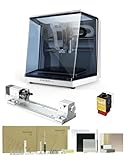
- 【Smart and Affordable】Carvera Air is a smart and affordable desktop CNC machine designed for makers, hobbyists, and small workshops. Mill, carve, and engrave with ease using our intuitive Makera CAM software. Perfect for creating prototypes, custom parts, jewelry, electronics projects, and DIY crafts.
- 【Compact Size with Professional Workspace】Carvera Air features a 11.8" x 7.9" x 5.1" work area for detailed CNC machining while maintaining a compact fully enclosed footprint of 19.7" x 17.7" x 17.7". The enclosed design helps: reduce noise/contain chips and dust/improve safety for home workshops. Perfect for desktops, maker spaces, labs, and small studios.
- 【Quick Tool Changer – Switch Tools in 10 Seconds】Speed up your workflow with the built-in quick tool changing system. Change milling bits in just 10 seconds, making multi-step machining faster and easier. Ideal for CNC jobs that require multiple tools such as engraving, drilling, and cutting in a single project. Spend less time setting up and more time creating.
- 【High Precision CNC with Auto Probing & Leveling】Carvera Air is designed for industrial-level accuracy in a desktop CNC machine. Spindle runout < 0.0004in/Motor resolution 0.0002in/automatic probing and surface leveling.The system automatically calibrates your workpiece, ensuring accurate cuts even on uneven materials.Perfect for precision parts, PCB milling, and detailed engraving.
- 【Smart CNC Control with Cross-Platform Software】Control your CNC machine easily with Wi-Fi or USB connectivity. Makera CAM software supports MacOS/Windows. Makera Controller compatibility:iOS/Android/MacOS/Windows/Linux. Carvera Air also integrates with popular CAD/CAM software including Fusion360, SolidWorks, and VCarve Pro, making it ideal for both beginners and professional makers.
Manufacturer-published specifications
The figures below are specifications published by Makera, not independent measurements of finished-part performance.
| Specification | Makera Carvera |
|---|---|
| Work area | 360 × 240 × 140 mm (14.2 × 9.4 × 5.5 in) |
| Approximate footprint | 580 × 520 × 540 mm (22.8 × 20.5 × 21.3 in) |
| Approximate weight | 50 kg (110 lb) |
| Gantry clearance | 120 mm (4.7 in) |
| Spindle power | 200 W |
| Spindle speed | 0–15,000 RPM |
| Spindle control | Closed-loop |
| Tool changer | Automatic, six positions |
| Published spindle runout | Less than 0.01 mm (0.0004 in) |
| Published resolution | 0.01 mm (0.0004 in) |
| Maximum travel speed | 6,000 mm/min |
| Optional fourth-axis work area | 92 mm diameter × 240 mm length |
Resolution is not a promise of finished-part accuracy. Runout is a spindle-related specification, not a guarantee that every cut will meet a particular tolerance. Results also depend on calibration, cutter quality and deflection, material, feeds and speeds, workholding, stock flatness, and toolpath quality.
Materials and projects
Makera lists wood, plastics, aluminum, brass, copper, composites, and printed circuit boards among the Carvera’s applications. The software documentation also describes workflows for 2D vectors, 3D toolpaths, PCB milling, image conversion, laser engraving, and rotary or fourth-axis work. A laser and rotary axis are optional accessories, not built-in capabilities to assume are included with the standalone machine.
The Tool Desk
Outbyte Driver Updater FREEFix the driver behind crashes, sound loss and screen glitchesFind Drivers →Outbyte PC Repair FREEClear out junk files and repair common Windows errorsFree Scan →- Wood and plastics: Useful for prototypes, panels, reliefs, and engraved parts. Plan for dust or chips, chip evacuation, melting in some plastics, and the risk of fire.
- Aluminum, brass, and copper: These are possible materials, but results depend on alloy, cutter geometry, conservative feeds and speeds, workholding, chip evacuation, and an appropriate lubrication or cooling strategy. The 200 W spindle and desktop format are not a basis for assuming industrial metal-removal rates.
- PCBs and composites: PCB milling and FR4 or carbon-fiber work need particular attention to dust collection and respiratory protection. Composite dust can be hazardous; an integrated vacuum should not automatically be treated as sufficient filtration.
- Steel and titanium: Makera lists limitations and says prolonged processing is not advised. Do not treat the Carvera as a general-purpose steel-cutting mill.
- Optional laser work: Makera identifies wood, plastic, fabric, leather, and cardboard as laser-compatible material categories. Laser use adds separate eye-protection, ventilation, and material-safety requirements; it does not make the machine equivalent to a purpose-designed laser cutter.
Makera’s getting-started material emphasizes that speeds and feeds matter: unsuitable settings can break tools or damage the machine. The machine’s ability to move a cutter through a material does not mean every combination of material, cutter, and cutting depth is appropriate.
Rank #3

- Smart and Affordable Desktop CNC Machine: Carvera Air is a precise and versatile desktop CNC mill for milling, carving, and engraving. Easy to use with user-friendly software. Endless Materials | Quick Tool Changer | Auto Probing and Leveling | Optional 4th Axis and Laser supported | All-in-one CAM Software
- 4th Axis Module for Expanded Capabilities: The 4th axis module expands your capabilities, enabling cylindrical machining, double-sided objects, and 3D shapes. With a rotary work area of 3.6 inch diameter x 7.9 inch length (9.2cm x 20cm), Carvera Air supports true 4th-axis simultaneous machining for crafting detailed 3D models
- Quick Tool Changer for Efficient Workflow: Speed up your workflow with the quick tool changer, switching tools in just 10 seconds. Whether milling wood, plastics, or metals, transitions between tools are seamless for advanced multi-step projects
- Precision Auto-Probing and Leveling System: With auto-probing and leveling, Carvera Air ensures precise calibration and flawless cuts on uneven materials. The closed-loop spindle control (0-13,000 RPM) and spindle runout less than 0.01mm guarantee exceptional accuracy and surface quality, even for high-complexity machining
- Cross-Platform Software Compatibility: Operate your CNC effortlessly with WiFi or USB connectivity. The intuitive Makera CAM software supports Mac OS and Windows; The Controller supports iOS, Android, Mac OS, Windows, and Linux, and integrates with popular CAD/CAM tools such as Fusion360, SolidWorks, and VCarve Pro
Space, setup, and ownership needs
Makera’s unpacking manual recommends at least 10 cm of clearance from a wall and desk space of at least 60 × 60 cm. Those are baseline placement figures, not a substitute for planning access around the machine. Allow room to open the lid, load stock, reach controls and connections, clean chips, and work with tooling and dust collection. Use a sturdy, level surface; moving a roughly 50 kg machine generally calls for two people.
Budget beyond the machine price for cutters and replacement tooling, collets, workholding, stock, dust control, personal protective equipment, and maintenance. Optional rotary or laser equipment and material-specific cooling or air assistance may add further cost. Confirm accessory compatibility with the exact Carvera model before ordering; documentation for Carvera Air does not establish that every accessory fits the original Carvera.
Software and a typical job workflow
Makera CAM and Controller
Makera CAM is designed for Carvera and Carvera Air workflows. Its documentation describes 2D vector and 3D toolpaths, PCB milling, laser engraving, image import and conversion, rotary work, and material and tool libraries. For the Carvera, tool-number assignment is tied to the automatic changer. The Makera software page describes a 15-day trial for non-customers; trial terms and availability can change.
Makera Controller connects to the machine, opens or uploads G-code, previews toolpaths, configures work zero and probing, monitors jobs, and provides manual controls. Makera’s documentation captured in 2026 lists Windows, Mac, and Android support, with iOS described as coming soon. Software compatibility and interface labels can change, so check Makera’s current documentation before relying on a particular operating system or menu path.
Rank #4

- 【Smart and Affordable :A Hobbyist's Dream Desktop CNC Machine】Carvera Air, a precise and versatile desktop CNC mill. Perfect for milling, carving, and engraving. Easy to use with our user-friendly software. Endless Materials | Quick Tool Changer | Auto Probing and Leveling | Optional 4th Axis and Laser supported | All-in-one CAM Software
- 【One More Axis, Infinite Possibilities】The 4th axis module expands your capabilities, enabling cylindrical machining, double-sided objects, and 3D shapes. With a rotary work area of 3.6" diameter x 7.9" length (9.2cm x 20cm), Carvera Air supports true 4th-axis simultaneous machining, perfect for crafting detailed 3D models.
- 【Quick Tool Changes for Complex Projects】Speed up your workflow with the quick tool changer, switching tools in just 10 seconds. Whether you're milling wood, plastics, or metals, transitions between tools are seamless, making it ideal for advanced multi-step projects.
- 【Precision Meets Automation】With auto-probing and leveling, Carvera Air ensures precise calibration and flawless cuts on uneven materials. The closed-loop spindle control (0–13,000 RPM) and spindle runout <0.01mm guarantee exceptional accuracy and surface quality, even for high-complexity machining.
- 【Smart Control with Cross-Platform Software】Operate your CNC effortlessly with WiFi or USB connectivity. The intuitive Makera CAM software supports Mac OS, Windows; The Controller supports iOS, Android, Mac OS, Windows, and Linux, and integrates with popular CAD/CAM tools such as Fusion360, SolidWorks, and VCarve Pro.
From design to cut
- Design or import the part. Define the finished geometry and the stock you intend to machine.
- Build the CAM job. Choose tools and cutting parameters, assign the tool numbers, generate toolpaths, and inspect the preview.
- Secure the stock. Ensure the workpiece is stable and clear of the intended cutter path.
- Start and connect. Power on, allow the machine to home, and connect through the Controller by the available USB or network method.
- Set the work position. Establish the anchor point or work zero and select only the probing, scanning, or leveling steps appropriate to the job.
- Verify tool state. Confirm that the assigned cutters occupy the correct tool-changer positions and are properly installed.
- Run under supervision. Watch tool changes, chip evacuation, cutting sounds, and machine status. Stop safely if stock shifts, a cutter breaks, or conditions become abnormal.
- Inspect and clean. Remove the part, check the result, and clear chips and debris in accordance with the manual.
Safety: enclosed does not mean risk-free
Makera’s safety guidance calls for goggles, keeping the cover closed during operation where appropriate, hearing protection when machining hard materials, and keeping children and bystanders away. Do not touch cutters or moving parts. Use suitable dust extraction and respiratory protection for hazardous dust, including carbon fiber or epoxy-related materials, and keep a fire extinguisher nearby because machining or laser settings can create a fire hazard.
The enclosure can reduce exposure, but it does not eliminate rotating-tool or broken-tool hazards, ejected workpieces, noise, dust, fumes, or fire risk. It also does not remove the need to supervise a job. Makera says not to leave the machine operating unattended. If a workpiece becomes loose, a component is damaged, or the machine makes unusual sounds or shows abnormal behavior, stop the machine using the emergency stop or main power button as appropriate; do not try to restrain moving stock by hand.
Carvera versus Carvera Air
The original Carvera and Carvera Air are separate models. The Air preserves an enclosed, guided workflow at a lower price, but the full Carvera’s six-position tool changer is the key distinction for multi-tool work.
| Feature | Carvera | Carvera Air |
|---|---|---|
| U.S. listed price observed August 18, 2026 | $5,799 standalone | $2,499 sale price; $2,699 regular price |
| Work area | 360 × 240 × 140 mm | 300 × 200 × 130 mm |
| Approximate weight | 50 kg (110 lb) | About 35 kg (77 lb) |
| Tool changing | Automatic, six-position changer | Manual or quick tool-change workflow |
| Published spindle speed | 0–15,000 RPM | 0–13,000 RPM |
| Dust handling | Integrated vacuum or dust system listed | External or optional dust-collection accessories |
| Typical fit | More frequent multi-tool jobs and larger desktop work | Lower-cost entry and jobs that can tolerate manual tool changes |
Makera’s U.S. product page also listed the Carvera 4th Axis Bundle at $6,099 and 4th Axis PCB Bundle at $6,299 on August 18, 2026. The U.S. Carvera Air page showed a laser bundle at $2,598 and a fourth-axis bundle at $2,898 that day. These are dated storefront observations, not permanent prices. Regional storefronts, promotions, taxes, shipping, bundle contents, and availability can differ.
Best Value

- Side Clamp Set (2pcs) for Makera Carvera and Carvera Air Desktop CNC Makchine
- These works both for Carvera and Carvera Air. The side clamp is typically used in conjunction with the thick L-Bracket to secure workpieces thicker than 2 cm.
- used to fix processing materials and also compatible with other CNC machines
Alternatives and how to choose
Carvera Air
The Air is the most direct in-family alternative for someone who wants an enclosed desktop CNC with a smaller work area and lower entry price. It retains probing and setup assistance but requires manual tool changes. It is a more sensible fit if most jobs use one cutter and the Carvera’s automatic changer would sit idle.
Carbide 3D Nomad 3 and Nomad 4
Carbide 3D’s Nomad 3 product page listed a price of $2,800 and showed the machine as unavailable in the captured listing. It specifies an 8 × 8 × 3-inch cutting area, 130 W spindle rated up to 24,000 RPM, safety-door interlock, and included MeshCAM software. The official Nomad collection listed the Nomad 4 at $5,400; confirm current availability and specifications with Carbide 3D because the collection listing provided less detail. These are relevant alternatives for buyers prioritizing an enclosed, compact machine and bundled software over the Carvera’s larger work area and six-position automatic tool changer.
Open-frame hobby routers
An open-frame router can cost less or provide a larger work area, but often shifts more of the burden to the owner: assembly, calibration, enclosure planning, dust management, and manual tool handling. It may be the better value for occasional wood carving or large work, if the buyer is prepared to build a suitable setup. For heavy production, large parts, or demanding metal removal, compare machines designed for those duty cycles rather than assuming a desktop mill is a substitute.
Who should consider the Carvera?
- Makers and product designers who need repeatable prototypes or custom small parts.
- PCB designers and electronics hobbyists who value a compact milling workflow.
- Small businesses producing short runs where reduced manual tool changes matter.
- Educators and makerspaces seeking an enclosed machine with integrated setup features.
- Experienced CNC users who want probing and automatic tool changes in a desktop footprint.
- 3D-printer owners ready to learn workholding, cutter selection, feeds and speeds, and active supervision.
When it is probably the wrong machine
- You mainly want occasional wood signs or reliefs and a cheaper router would do the job.
- You expect to start a job and leave it unattended.
- You lack a sturdy bench, lifting help, or a plan for lid clearance, dust, noise, and ventilation.
- You need to machine large panels, furniture parts, or other work beyond the stated work area.
- You need industrial duty cycles, high material-removal rates, flood coolant, or frequent steel machining.
- You are unwilling to learn CAD/CAM and basic machining practice, or have not confirmed compatibility with a required software workflow.
How to decide whether the premium is worthwhile
The Carvera’s strongest case is workflow convenience: automatic tool changes combined with probing, an enclosure, and software built around the machine. That premium is most defensible when multi-tool jobs are common, the work fits the 360 × 240 × 140 mm area, and the owner can provide the setup, tooling, dust control, and supervision CNC requires. If jobs usually use one cutter, a smaller machine such as the Carvera Air or a simpler router may be a better match. For advanced users, verify CAD/CAM post-processor support and required features before purchase rather than assuming a familiar workflow will transfer unchanged.
For U.S. buyers, the Carvera standalone price observed on Makera’s U.S. page was $5,799 on August 18, 2026; the Global page separately showed a $5,499 sale price against a $5,799 regular price. Prices and bundles change, and those storefront figures should not be read as a universal or current quote. Check the relevant regional listing for the price, included accessories, shipping, taxes, and availability.
Quick Recap
Product prices and availability are accurate as of the date/time indicated and are subject to change. Any price and availability information displayed on Amazon at the time of purchase will apply.


Leave a Reply